Home Sports Surfaces Testing About Request a Quote
Application

UV Printing for Membrane Switch Overlays & Control Panel Graphics

Graphic overlays, keypad faceplates and front panel graphics for equipment makers, OEMs and membrane switch builders. Printed on polyester and polycarbonate films, usually from behind, with windows, blocking layers and color matched to your brand.

Request a Quote →
The Short Answer

The Overlay Is the Part of the Product Everyone Touches

On a membrane switch, a keypad or an equipment control panel, the graphic overlay is the top layer: the printed film that shows where each key is, carries the logo and icons, frames the display window and seals the electronics underneath from spills and grime. UV printing decorates that film by jetting ink and curing it instantly with UV light. For overlays the print almost always goes on the back face, so the film itself takes the finger presses and the cleaning. The two decisions that matter most are which film to print on, polyester or polycarbonate, and how the panel will be used and cleaned. Get those right and the graphics last as long as the product. Get them wrong and keys crack, windows haze or legends wear off. UV printing is a strong fit for prototypes, short and medium runs, multiple versions of one panel and graphics that change between models. For very long runs of one fixed design, screen printing is often still the cheaper route, and we will tell you if that is the case.

How It Works

Where the Overlay Sits in the Stack

A membrane switch is a sandwich. From the bottom up there is usually a rear adhesive, a printed circuit layer, a spacer with holes over each key, a top circuit or dome layer, and then the graphic overlay bonded on top with its own adhesive. Film supplier Tekra describes the overlay as the layer that shows the location and function of each key, decorates the device, protects the switch layers from liquids, grease, dirt and cleaning chemicals, helps shield the electronics from static discharge, and provides windows for indicator lights or displays.

That list explains why overlay printing is different from printing a sign. The film flexes every time a key is pressed. It is wiped, sprayed and sometimes scrubbed. Its windows have to stay clear over LEDs and screens. And the printed layer has to bond to the adhesive behind it without lifting at the edges.

Polyprint prints the decorated layer: the overlay, faceplate or front panel graphic. The circuit, spacer, domes and tail are built by a membrane switch manufacturer or your electronics supplier. We work to their die line and stack-up, and we can ship printed, unconverted sheets or work with their converting spec.

Second-surface printing on polyester and polycarbonate films
White and opaque blocking layers behind color
Clear windows left unprinted for LEDs and displays
Brand color matching across panel versions
Short runs, prototypes and variable legends without screens
Ask About Your Overlay →
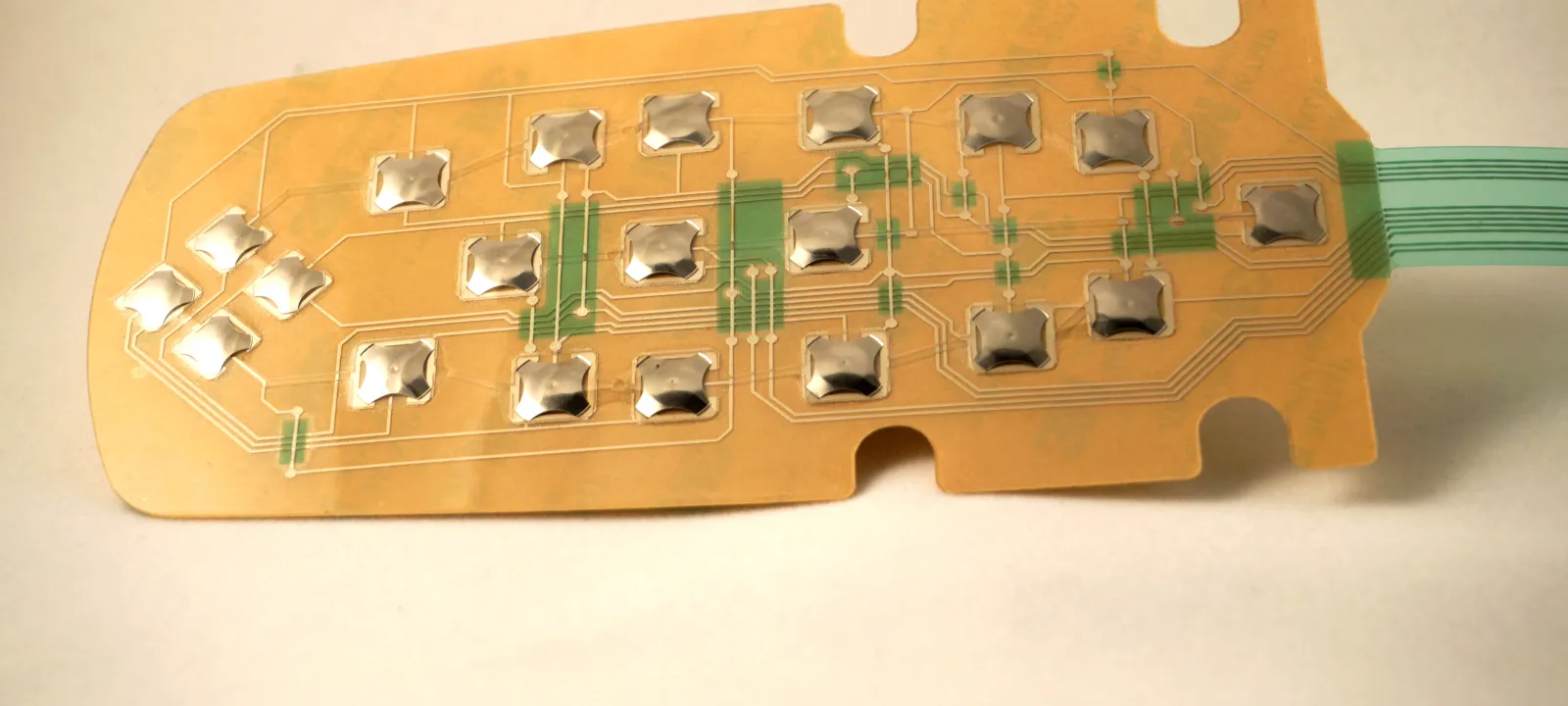
Membrane switch circuit layer with metal tactile domes and a flexible tail, the layer a printed graphic overlay covers

The circuit and dome layer of a membrane switch, which the printed graphic overlay sits on top of. Not a Polyprint project. Photo: Btechnologies, Wikimedia Commons, CC BY-SA 4.0 (cropped).

Film Choice

Polyester or Polycarbonate: The Decision That Sets the Lifespan

Both films print well with UV ink when they carry the right primer or surface treatment. They fail in different ways, so the question is what your panel will go through.

Property Polyester (PET) Polycarbonate (PC)
Flex life on keys Generally far longer. Tekra notes PET usually outperforms the design requirements of the device. Can reach high counts only under ideal conditions; inks, pressure and chemicals can cut it sharply.
Chemical resistance Broad resistance to household and industrial chemicals; the usual pick for clinical, lab and food-service equipment. Prone to stress cracking from alcohols, ketones and alkaline cleaners; shows as crazing, haze or brittleness.
Scratch and scuff Needs a hard coat for real-world use; hard-coated PET is very scuff resistant. Textured grades such as suede or velvet hide scuffs without a separate hard coat.
Clarity and windows Good, especially with clear window lacquers on textured films. Excellent optical clarity; a common choice for display windows.
Printing and die cutting Needs the right ink-receptive primer; cuts cleanly with the right tooling. Easier to print and die cut; available in flame-rated (UL 94) grades.
Typical fit High-use keypads, washdown or disinfected equipment, medical and lab devices Lower-cycle panels, nameplates, display bezels, decorative fascias

Summarized from Tekra’s white paper comparing PET and PC overlay films and from overlay makers’ published guidance. These are general tendencies, not guarantees for a specific panel.

What the Data Sheets Actually Say

MacDermid’s Autotex, a widely used textured, hard-coated polyester overlay film, is sold in versions with a primer intended for UV-cured inkjet and UV screen inks, alongside versions for solvent screen inks. Its technical data sheet lists switch life above 5 million actuations under the supplier’s own test method, a maximum use temperature of 85 °C in low humidity (lower in high humidity) and a minimum of −40 °C. Tekra’s comparison puts the dielectric strength of PET slightly above PC at the same 10 mil thickness. Numbers like these come from the film maker’s tests on the film. Your panel’s life also depends on key travel, embossing, ink and adhesive, so treat them as a starting point.

Embossing Changes the Math

Raised or embossed keys help users find buttons by feel, but stretching the film reduces flex life on both materials, and Tekra notes the drop is far steeper for polycarbonate. If your design calls for embossed keys on a panel that will be pressed thousands of times a day, that pushes the choice toward polyester. If you only need a tactile cue, a printed raised texture can sometimes do the job without forming the film. Our spot gloss and raised texture page explains what UV layering can build up and where its limits are.

Have a Die Line and Artwork?

Send the overlay die line, the artwork, the film you have in mind (or the environment, if you are not sure) and the quantity. We will come back with a film and ink recommendation and a quote.

Print Build

How a Second-Surface Overlay Is Printed

Printing on the back of clear film means building the image in reverse order. What the user sees first is printed first.

1. Detail and legends

Key legends, icons, small text and logo detail go down first, mirrored, directly against the film. This is the layer that has to be sharpest, so fine type is set at a size and weight that reads cleanly through the film and any surface texture.

2. Background colors

Fields of color, key outlines and borders follow. Brand colors are matched here. If several panel variants share a brand palette, the same color targets are used across all of them so a 4-key and a 12-key version look like one family. See our color matching and Pantone page for how close a match to expect and how we prove it.

3. White and blocking layers

Behind the color goes white, so colors read at full strength rather than looking thin against whatever sits underneath. Where light from LEDs or a backlight must not bleed through, an opaque blocking layer is added behind the white. Our page on white ink and opaque underprinting covers how many layers are typical and why.

4. Windows and translucent areas

Display windows are left unprinted, or tinted with a transparent color, so the screen behind stays readable. Indicator lights can sit behind small translucent windows that glow when the LED is on. On textured films, makers offer clear window lacquers; MacDermid’s Windotex, for example, is printed selectively on Autotex to make transparent gloss or anti-glare windows. Window placement has to match the display or LED position on the circuit layer, so we work from the switch maker’s drawing, not just the artwork.

5. Adhesive and converting

The printed back face then gets an adhesive layer, and the sheet is die cut to the final outline, including window cutouts or tail slots. The adhesive has to be compatible with the ink surface, not just the film, which is one reason overlay builds are proofed as a complete stack before production.

Design Notes

Details That Decide Whether an Overlay Works

Dead-front effects. A dead-front panel looks solid until an indicator lights up, then the icon glows through. It depends on ink density being tuned so the area reads as opaque when unlit and passes light when lit. That balance depends on the LED brightness behind it, so it has to be tested with the real light source, not judged on a sample sheet under office lights.

Cleaning regime. Ask the people who will clean the equipment what they actually use. Isopropyl alcohol wipes, quaternary disinfectants, bleach solutions and degreasers all behave differently on different films. A panel on a hospital cart and a panel on a garage door opener have nothing in common here. If the cleaning list includes alcohols or alkaline cleaners, polycarbonate needs a hard coat and a careful look, or polyester becomes the safer base.

Outdoor and sunlight exposure. Panels on outdoor equipment, kiosks or vehicles see UV, heat and temperature swings. Check the film’s use-temperature range and outdoor rating, and expect the adhesive and edge seal to matter as much as the ink.

Legibility. Legends are often read at arm’s length, in poor light or with gloves on. High contrast between legend and key color beats a clever font. Avoid hairline strokes, and remember that a matte or textured surface softens fine detail slightly.

Regulatory markings. Many panels carry safety symbols, ratings or certification marks. Supply these as vector artwork from the source, at the size the standard or your compliance team requires. We print what you approve; we don’t certify the device.

Version control. Equipment lines often have dozens of near-identical panels: different languages, key counts or model numbers. UV printing doesn’t need a new screen for each variant, which makes versioned runs practical. Name each file by part number and revision so a reorder pulls the right one.

Tested Durability

The Polyprint Benchmarks, and What They Do and Don’t Cover

These are the independently tested results behind Polyprint surfaces, measured on rigid test panels in lab conditions. They describe our print on rigid substrates. They are not switch-life or flex-life results for a film overlay, which depend on the film, key design and adhesive. Full data is on the testing page.

☀️

UV Weathering

No Change at 3000h

EN ISO 16474-3 Atlas UV Test — zero surface change after 3000 hours of exposure.

✏️

Scratch Resistance

6H Pencil

EN 15184 pencil hardness test — rated 6H on rigid substrates.

💥

Impact Resistance

>60N

EN 438-2 ball impact testing — maximum machine rating with no visible damage on rigid panels.

🔬

Wear Resistance

Class 31

DIN EN 14354 Taber Abraser — achieved classification 31 in tested conditions.

View Full Testing Data →
Beyond Membrane Switches

Other Control Panel Graphics We Print

The same film and second-surface approach shows up across a lot of equipment that never has a membrane switch inside.

Capacitive touch panels. Glass or plastic front panels over touch sensors use printed icons and windows the same way, without moving keys. Flex life matters less; clarity, color and the bond to the sensor matter more.

Equipment faceplates and bezels. Decorative fronts for test instruments, kiosks, appliances and industrial controllers, often polycarbonate printed from behind with display windows. Our UV printing on polycarbonate page covers that substrate in more depth.

Nameplates, rating plates and asset tags. Model, serial and compliance information that has to survive the life of the machine. See UV printing for nameplates and asset tags for metal and plastic options.

Replacement overlays for legacy equipment. When an original overlay has worn through and the manufacturer no longer supplies it, a new one can be drawn from the old part and printed to fit. Bring the original or a precise drawing and the circuit layout so key and window positions line up.

Quoting

What We Need to Quote an Overlay

Send the die line (DXF or vector PDF) showing the outline, key positions, windows and any cutouts; the artwork with legends as live vector text or outlines; your film preference, or a description of the environment and cleaning products if you want a recommendation; quantity and number of versions; and whether you need printed sheets, die-cut parts, or parts with adhesive applied. If a membrane switch manufacturer is building the rest of the stack, tell us who, so we can work to their spec. Our file prep requirements page covers resolution, color mode and how to set up white and blocking layers.

Price depends on film, size, ink layers, windows, quantity and converting, so we don’t publish a per-piece price. We quote the actual part, and for a new design we recommend a proof run on the real film before production.

FAQ

Overlay Printing — Common Questions

Can graphic overlays be UV printed?

Yes. UV inkjet printing is used to decorate polyester and polycarbonate overlay films, usually on the back face (second surface) so the film protects the ink. Some overlay films are sold with primers made specifically for UV-cured inkjet inks. It suits short runs, prototypes and variable graphics; very long runs of a single design are often screen printed.

Should a membrane switch overlay be polyester or polycarbonate?

Polyester (PET) is usually chosen when keys will be pressed many times or the panel is cleaned with alcohol or disinfectants, because it generally has much longer flex life and broader chemical resistance. Polycarbonate (PC) is clearer, easier to print and cut, comes in more textures and in flame-rated grades, and suits lower-cycle panels and display windows.

Why are overlays printed on the back side?

Printing on the second surface puts the film between the user’s finger and the ink. Pressing, wiping and cleaning chemicals hit the film’s hard-coated face, not the print, so the graphics don’t wear off. The print order is reversed: detail colors first, then white or blocking layers behind them.

Does Polyprint make the membrane switch circuit?

No. We print the decorated graphic layer: overlays, faceplates and front panel graphics. The circuit layers, spacers, domes and tail are built by a membrane switch manufacturer or your electronics supplier, and we work to their die line and stack-up.

How much do UV-printed overlays cost?

It depends on the film, size, ink layers, windows, quantity and finishing such as die cutting and adhesive. We don’t publish a price per piece. Send the die line, artwork, film preference, quantity and the environment the panel will live in and we will quote the actual job.

Sources: Tekra, “Tek Tip: Comparing Polyester and Polycarbonate Films for Switch Actuation Life”; MacDermid Autotex technical data sheet and MacDermid Alpha Industrial Films range brochure; Hallmark Nameplate, “Polycarbonate vs Polyester Graphic Overlays.” Checked October 28, 2026.

Explore More Surfaces

Related Applications

Need Overlays or Front Panel Graphics?

Send the die line, artwork, film preference or operating environment, quantity and number of versions. We will recommend a film and print build, quote the job, and suggest a proof run on the real film before production.